Make sponsors shine on every platform!

Displaying Sponsors in the Mobile App and on the Website

Learn how to configure sponsor labels to display sponsors in the mobile app and website widget, including setting up dedicated subpages for sponsors.

Article Image Alt

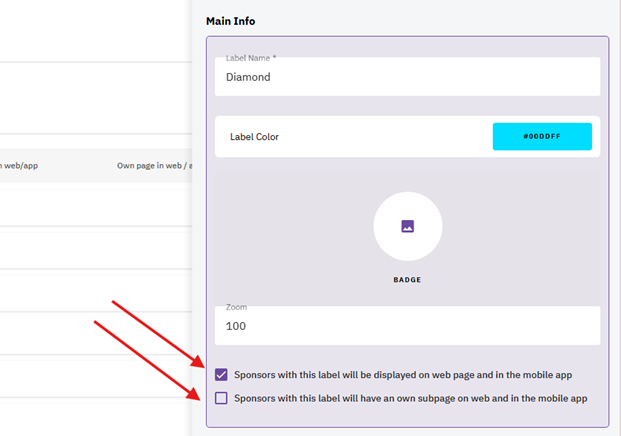
To make sponsors visible in the mobile app and the sponsor widget on your website, assign them a label that has the following checkbox enabled:
✔ "Sponsors with this label will be displayed on the web page and in the mobile app."

If sponsors have a dedicated subpage on your website, also enable:
✔ "Sponsors with this label will have their own subpage on the web and in the mobile app."

✔ On the sponsorship tab, "Sponsor has an own sponsor page (if sponsorship level enables it)" has to be checked as well.
                                           ![A screenshot of a computer AI-generated content may be incorrect.](https://runeventsdevpages.blob.core.windows.net/organizer-multimedia/21/862fc6b4-1164-4922-962a-43496758a272)

A screenshot of a computer AI-generated content may be incorrect.